
Official Timing Partner
A huge thank you to Dragy for their continued support of PEV racing in Australia. Their GPS lap timing technology is at the heart of how we record and validate every lap at AUS PEV Nationals — we couldn't do it without them.
Everything you need for race weekend — live schedules, personalised event details, lap times, leaderboards and more — all in your pocket.
Official Timing Partner
A huge thank you to Dragy for their continued support of PEV racing in Australia. Their GPS lap timing technology is at the heart of how we record and validate every lap at AUS PEV Nationals — we couldn't do it without them.
What's Inside
Always up-to-date event schedule straight from the officials. Know exactly what's happening and when, without needing to find a notice board.
See exactly which qualifying sessions and races you're entered in. Your personal event schedule, tailored to you — no digging through the full programme.
Send a shout-out to any racer to give them a boost before their heat. Build the pit-lane energy and show your fellow competitors some love.
Best lap times, championship leaderboards, current and upcoming sub-events — all live, all in one place. Follow the action as it unfolds on track.
Browse every competitor's profile — their bio, riding history, personal bests, and lap records. Get to know the field before race day.
Vote for the racer who made the event for you — the one with the best spirit, sportsmanship, or just an unforgettable ride. The community decides.
Got Questions?
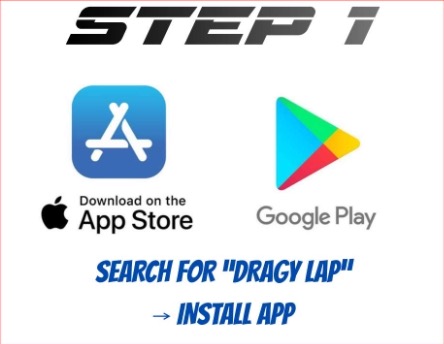
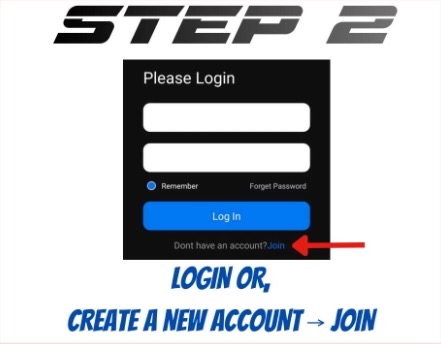
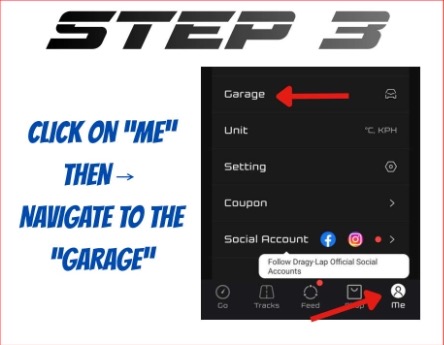
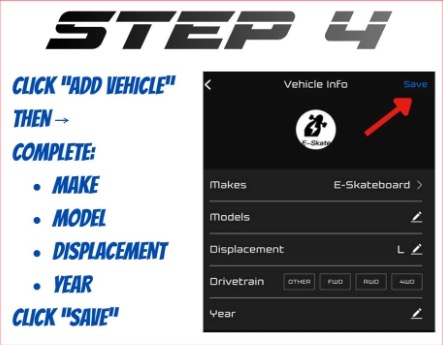
Yes — the official Dragy Lap app is required alongside the AUS PEV Racing app in order to record your lap times. You can download it here:
Your Dragy code will be provided to you approximately one week before the event. It personalises the app experience to you — linking your sessions, lap times, and race card directly to your profile.
No problem — AUS PEV has already assigned a Dragy unit to every racer from our own pool of devices. Yours will be handed to you at rider setup and briefing on the day. It must be returned before the end of the event.
Note: you technically only need the Dragy for qualifying, as actual race results are determined by finishing position rather than lap times.
Absolutely! If you'd prefer to use your own Dragy, you're welcome to. However, you must provide us with the hex code of your device in advance so we can correctly associate it with your profile, your lap times, and personalise your event experience accordingly.
You'll need a Bluetooth Low Energy (BLE) scanner app. Turn on your Dragy and scan for nearby devices — it will appear in the list with a name like Dragy-A1B2C3, where the last six characters are your hex code.
Step-by-Step

Get the App
Download the official AUS PEV Racing app before the event and have everything you need at your fingertips on race weekend.